
America/Sao_Paulo
Posts

Kafka: Core Concepts and First Steps in Practice

February 1, 2025
Cover foto.
Have you ever wondered how major companies like Netflix, Uber, and LinkedIn process millions of events per second in real time? From movie recommendations to live ride updates, continuous data processing is essential for delivering fast and efficient user experiences. This type of processing is known as event streaming, an approach that allows capturing, processing, and storing continuous data streams as they happen. Among the technologies that enable this model, Apache Kafka stands out as one of the most popular and robust solutions. Kafka is a distributed event streaming platform designed to handle large volumes of data in real time, ensuring high availability, scalability, and performance. Companies like Twitter, Netflix, and Airbnb use this technology for system monitoring, log processing, real-time data analytics, and many other applications. In this post, you'll learn the core concepts of Kafka and see how to set up a local cluster to understand in practice how it works. Let's go!
We defined Kafka above as an event streaming platform, but what exactly are these events? An event is a record of something that happened, the representation of a fact — they can also be called messages or records in the Kafka documentation. When we interact with Kafka, we do so by reading or writing events to it. An important property of an event is that it can be seen as a record in a log, meaning it is persistent and immutable. When we hear the word "log", we tend to think of the text records we generate in an application to observe its execution. However, when working with Kafka, we should think of a log as a data storage abstraction. I recommend reading this post, which covers the subject with the depth it deserves. Events in Kafka have three main fields: a key, a value, and a timestamp. In addition to these fields there are also optional headers for adding metadata. The following is an example event:
{
  "key": "Daniel",
  "value": "Logged into their account",
  "timestamp": "01-02-2025 8:52:32 AM GMT-03:00"
}
Apache Kafka was designed to run as a cluster, meaning it coordinates multiple nodes running the same application to ensure fault tolerance and scalability. This makes it possible to scale the cluster horizontally by adding new nodes when increased performance is needed, or to add more redundancy guarantees, since if one of the nodes fails, another node can take its place. In the most traditional way of operating an Apache Kafka cluster, it is necessary to separately instantiate an additional application called Apache ZooKeeper. This component is mainly responsible for achieving consensus among the cluster nodes on who will be the leader of each partition and for managing cluster metadata. However, starting from version 3.3, Kafka offers the option of using KRaft as the consensus protocol. This option eliminates the need to separately instantiate an application like ZooKeeper, since the logic is already included in Kafka itself, simplifying the process of creating a cluster. When using KRaft, a node in a Kafka cluster can act in two distinct roles: as a broker and/or as a controller. A broker is a Kafka instance that manages events, while a controller is responsible for storing cluster metadata and fulfilling consensus roles among nodes.
Topics .
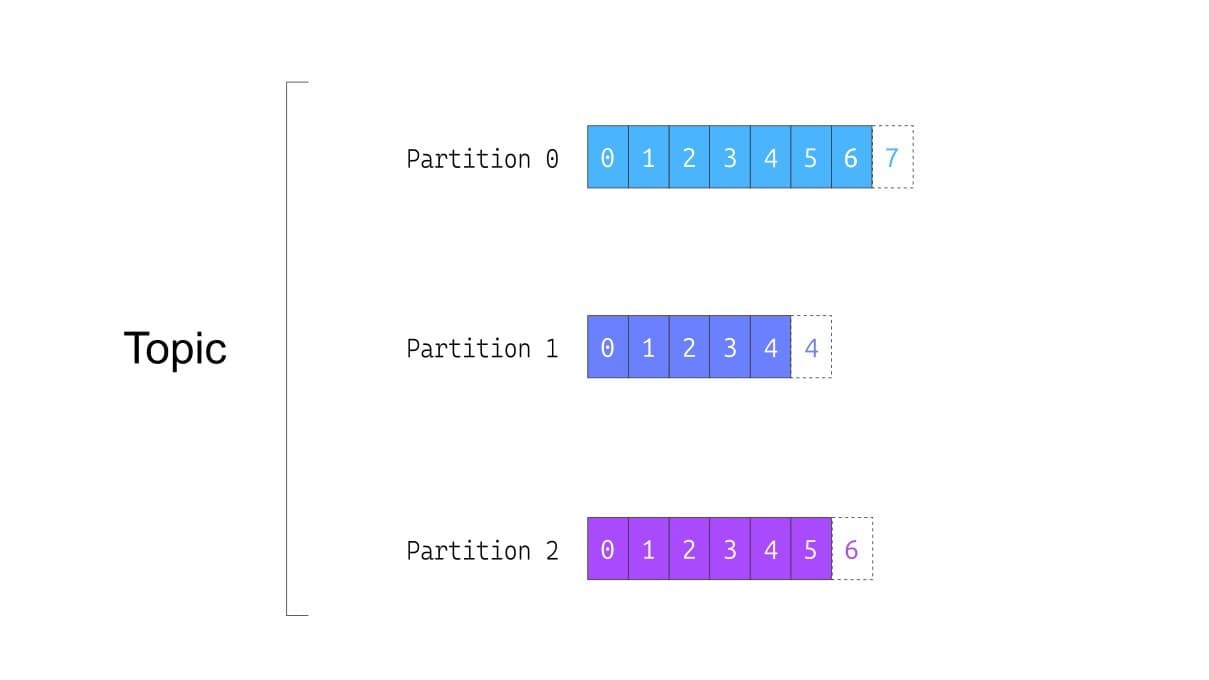
When consuming or producing messages to Kafka we must provide the name of a topic, which acts as a kind of file system directory where events of the same "category" are stored. Internally the topic is subdivided into partitions numbered from 0 to N-1, where each partition is an immutable event log. When an event is stored in a partition, it receives an offset, which is an incrementing integer value and unique to each event within that partition. Each partition starts at offset 0 and increments its value with each stored event. The logic used to determine which partition should receive each produced event works similarly to how a bucket is determined for a value given its key in a hash table. That is, the event's key is hashed, and the remainder of the division by the number of partitions is the partition number where it should be stored. This means that events with the same key are appended to the same partition in the order they are inserted. Note that there is no ordering guarantee for events in a topic in general, only for events with the same key within a partition. The number of partitions in a topic must be configured at the time of its creation. After the topic is created it is possible to increase the number of partitions, but doing so loses the key-ordering guarantees we mentioned above.
Partition Replication .
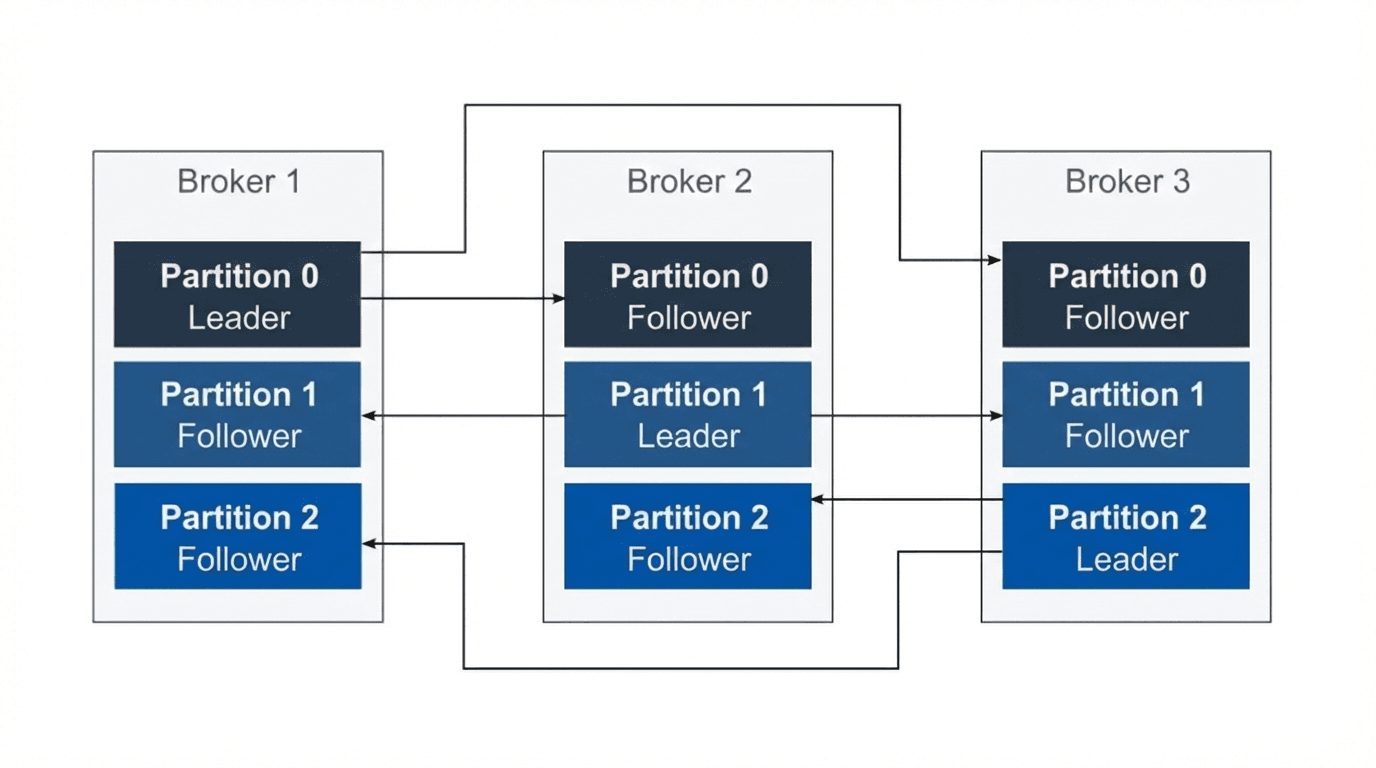
A topic's partitions are distributed across the cluster nodes and can be replicated among nodes to ensure service redundancy. Each partition has a node elected as its leader, which applications must use when reading and writing events to that partition. When a replication factor is configured on a topic, some nodes are designated as followers of each partition that makes it up, also called In-Sync Replicas (ISR). This way, if a leader node for certain partitions goes down or is lost, follower nodes for those same partitions can be elected as the new leaders and continue operation without data loss.
Producers and Consumer Groups .
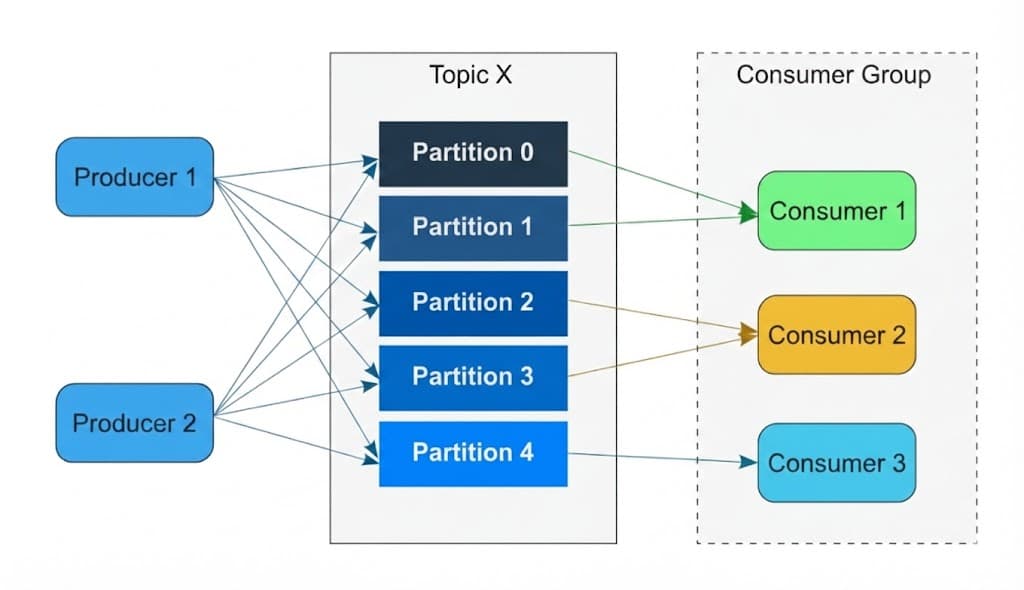
In Kafka terminology, Producers are applications that publish events, while Consumers are applications that read events. Despite the name, when a consumer reads an event it is not consumed, as happens in queue systems like RabbitMQ, ActiveMQ, and Amazon SQS. A single topic can have multiple producers and consumers. Consumers that belong to the same application — such as replicas of the same service — can be grouped into the same Kafka consumer group. Each consumer in a consumer group receives different messages from the same topic; this is possible because each partition of a topic is assigned to only one consumer in a consumer group, though a single consumer can be assigned to multiple partitions. This makes the number of partitions a unit of parallelism for Kafka consumers and is directly tied to the throughput that can be delivered on a topic. It also means that the maximum number of consumer group members actively consuming messages from the same topic equals the number of partitions in that topic. Kafka auto-balances the consumer assigned to each partition of a topic as the number of consumers in a consumer group grows or shrinks. The fact that it is difficult to change the number of partitions after a topic is created, combined with the fact that they are the fundamental unit for guaranteeing Kafka's throughput capacity and redundancy, makes this one of the things you need to get right from the start. Choose this value wisely! This blog post gives some tips on how to make this choice thoughtfully.
Now that we've seen in detail how Kafka works, let's spin up a single-node cluster locally using Docker Compose. Below is the setup we'll use. To run it, just have Docker installed on your machine, create a docker-compose.yaml file in any folder with the content below, and run the command docker compose up from a terminal in that folder.
docker-compose.yml
version: '3.5'
services:
broker:
  image: apache/kafka:3.9.0
  container_name: broker
  environment:
    KAFKA_NODE_ID: 1
    KAFKA_LISTENER_SECURITY_PROTOCOL_MAP: 'CONTROLLER:PLAINTEXT,PLAINTEXT_HOST_INTERNAL:PLAINTEXT,PLAINTEXT_HOST_EXTERNAL:PLAINTEXT'
    KAFKA_ADVERTISED_LISTENERS: 'PLAINTEXT_HOST_INTERNAL://broker:9093,PLAINTEXT_HOST_EXTERNAL://localhost:9092'
    KAFKA_PROCESS_ROLES: 'broker,controller'
    KAFKA_CONTROLLER_QUORUM_VOTERS: '1@broker:29093'
    KAFKA_LISTENERS: 'CONTROLLER://:29093,PLAINTEXT_HOST_INTERNAL://:9093,PLAINTEXT_HOST_EXTERNAL://:9092'
    KAFKA_INTER_BROKER_LISTENER_NAME: 'PLAINTEXT_HOST_INTERNAL'
    KAFKA_CONTROLLER_LISTENER_NAMES: 'CONTROLLER'
    KAFKA_OFFSETS_TOPIC_REPLICATION_FACTOR: 1
    KAFKA_NUM_PARTITIONS: 9
  ports:
    - "9092:9092"
kafka-ui:
  container_name: kafka-ui
  image: provectuslabs/kafka-ui:latest
  ports:
    - "8080:8080"
  environment:
    DYNAMIC_CONFIG_ENABLED: 'true'
Alongside Kafka we're also starting a Kafka-UI instance so we can interact with the cluster, creating topics and events. When creating the Kafka container we pass some environment variables responsible for configuring the broker. If we were configuring the broker through a configuration file, the keys of these variables would be equivalent to what we use here but in lowercase, without the "KAFKA_" prefix, and with dots instead of underscores. So the environment variable KAFKA_NODE_ID is equivalent to the node.id configuration, for example. Let's go through each broker configuration? KAFKA_NODE_ID
Represents the ID of this node within the cluster.
KAFKA_LISTENER_SECURITY_PROTOCOL_MAP
A comma-separated list of items. Each item is a key-value pair where the key is the listener name and the value is the communication protocol. We're using PLAINTEXT as the protocol, but in real-world scenarios it is recommended to use a protocol like SSL to encrypt data in transit.
We declare 3 listeners: PLAINTEXT_HOST_INTERNAL, visible internally within the Docker network; PLAINTEXT_HOST_EXTERNAL, visible on the host machine's network since we're exposing port 9092; and finally CONTROLLER, the controller listener which must be declared separately. KAFKA_ADVERTISED_LISTENERS
The listeners advertised by cluster nodes to help clients locate other nodes.
KAFKA_PROCESS_ROLES
Dictates the roles of this cluster node. In this case, since we're using KRaft mode, this node acts as both a controller and a broker.
KAFKA_CONTROLLER_QUORUM_VOTERS
Indicates the other voting nodes in situations where consensus is required, such as when electing a new partition leader. Since we're creating a single-node cluster, only this node is listed.
KAFKA_LISTENERS
All listeners declared by this cluster node.
KAFKA_INTER_BROKER_LISTENER_NAME
The name of the listener used for communication between brokers in the cluster, for tasks such as topic replication.
KAFKA_CONTROLLER_LISTENER_NAMES
The names of the listeners used for controller communication.
KAFKA_OFFSETS_TOPIC_REPLICATION_FACTOR
The replication factor of a special Kafka topic that stores the offsets of each consumer. It can take a maximum value equal to the number of broker nodes in the cluster. Since we're using only one, its value must be 1.
KAFKA_NUM_PARTITIONS
When a topic is automatically created by a consumer, Kafka uses this setting to determine the default number of partitions to use.
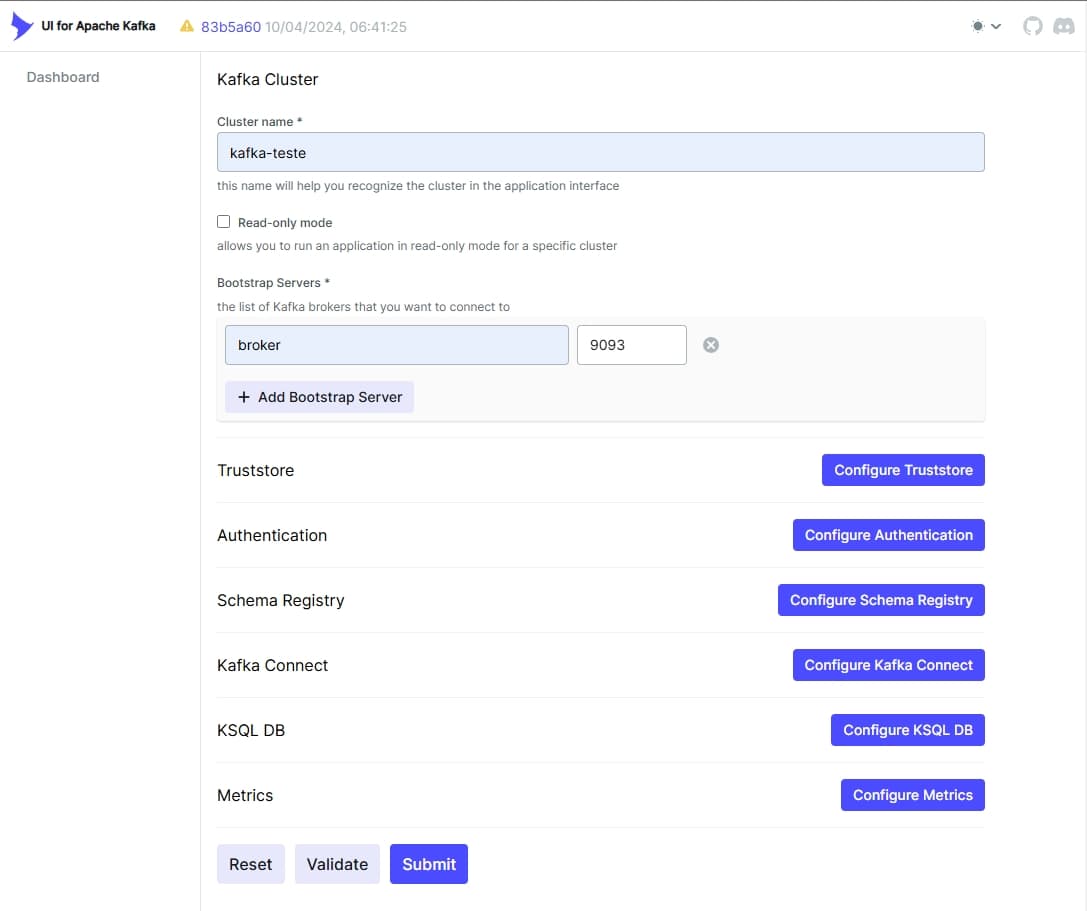
After starting the broker and the Kafka-UI instance, we can access http://localhost:8080 and fill in the Kafka-UI settings as follows.
Kafka-UI-1 .
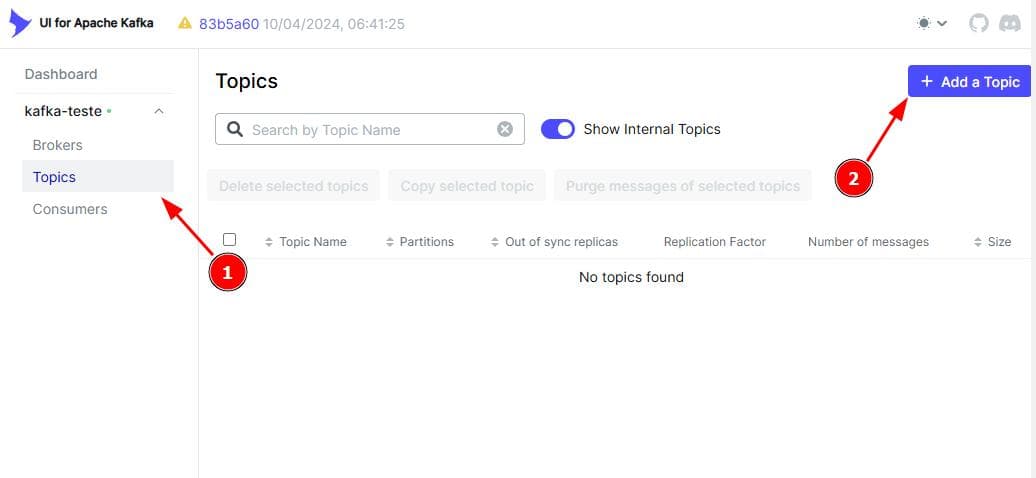
After clicking "Submit" we can access the configured broker data, click "Topics", and then "Add a Topic" as shown in the image below:
Kafka-UI-2 .
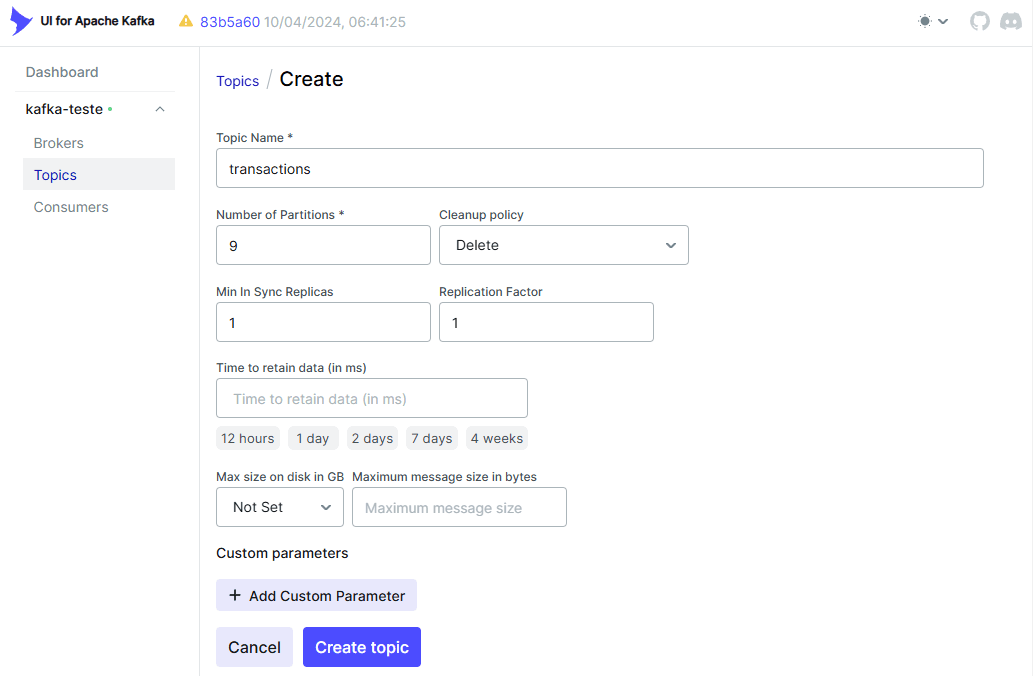
For testing purposes let's configure a topic called transactions, with 9 partitions, a replication factor of 1, and a minimum of 1 in-sync replica. Clicking "Create topic" will create our first topic!
Kafka-UI-3 .
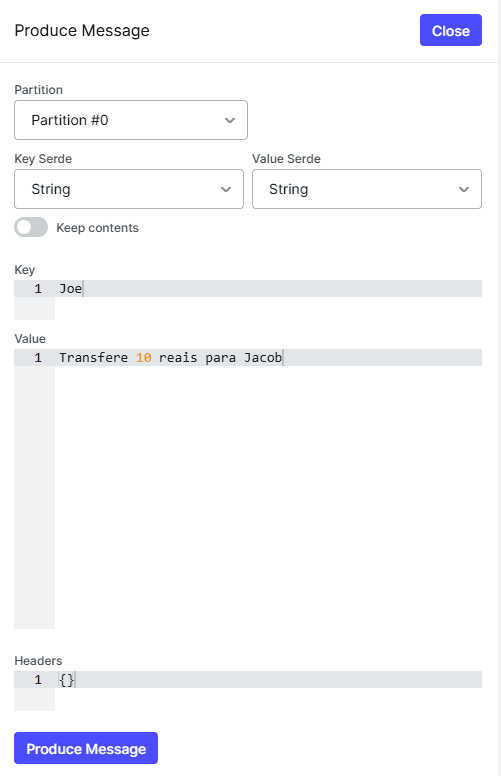
When we enter the page of the newly created topic we'll see a "Produce Message" button. We can click it to open a menu and produce our first message.
Kafka-UI-4 .
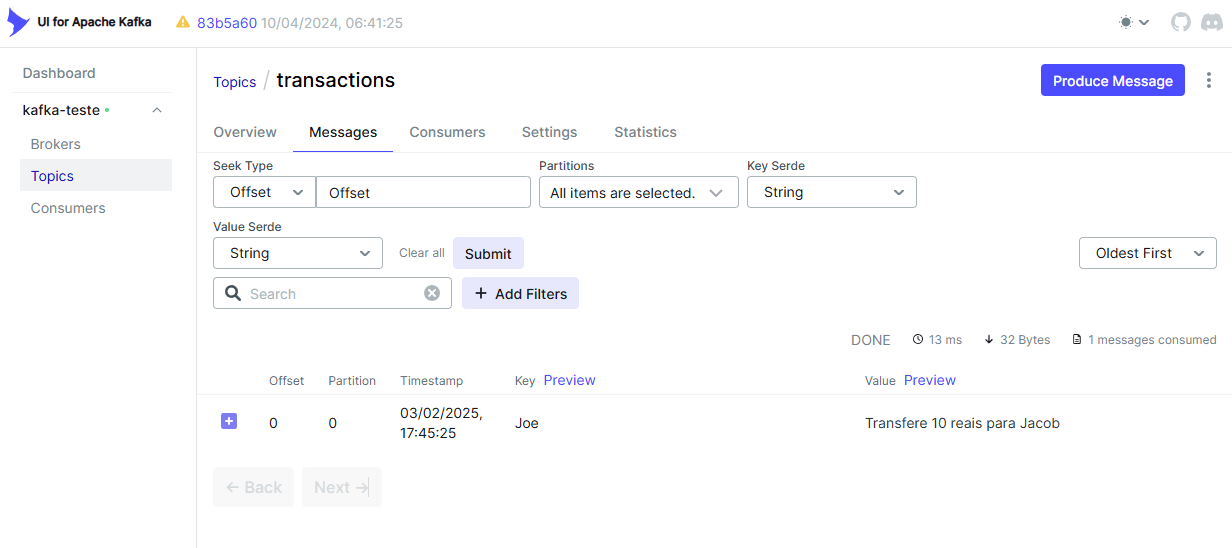
After producing our message, it can be observed in the "Messages" tab of the topic.
Kafka-UI-5 .
In this post, we explored the main concepts of Apache Kafka and understood how it enables scalable, distributed, and fault-tolerant communication between processes. We saw how events are stored and organized into topics and partitions, ensuring parallelism and ordering, as well as how brokers, producers, and consumers interact to make this architecture efficient. Beyond the theory, we got our hands dirty and set up a local Kafka environment using Docker and Kafka-UI to visualize and interact with the system in a practical way. This first contact with Kafka is fundamental to understanding how it works and its advantages — but there's much more to explore! Next steps could include diving deeper into using producers and consumers with code, exploring how to encrypt communication with the brokers, how to integrate with a Schema Registry to ensure message uniformity within a topic, and much more. If you want to work with distributed systems and real-time event processing, mastering Kafka will be a huge differentiator!