
Introduction
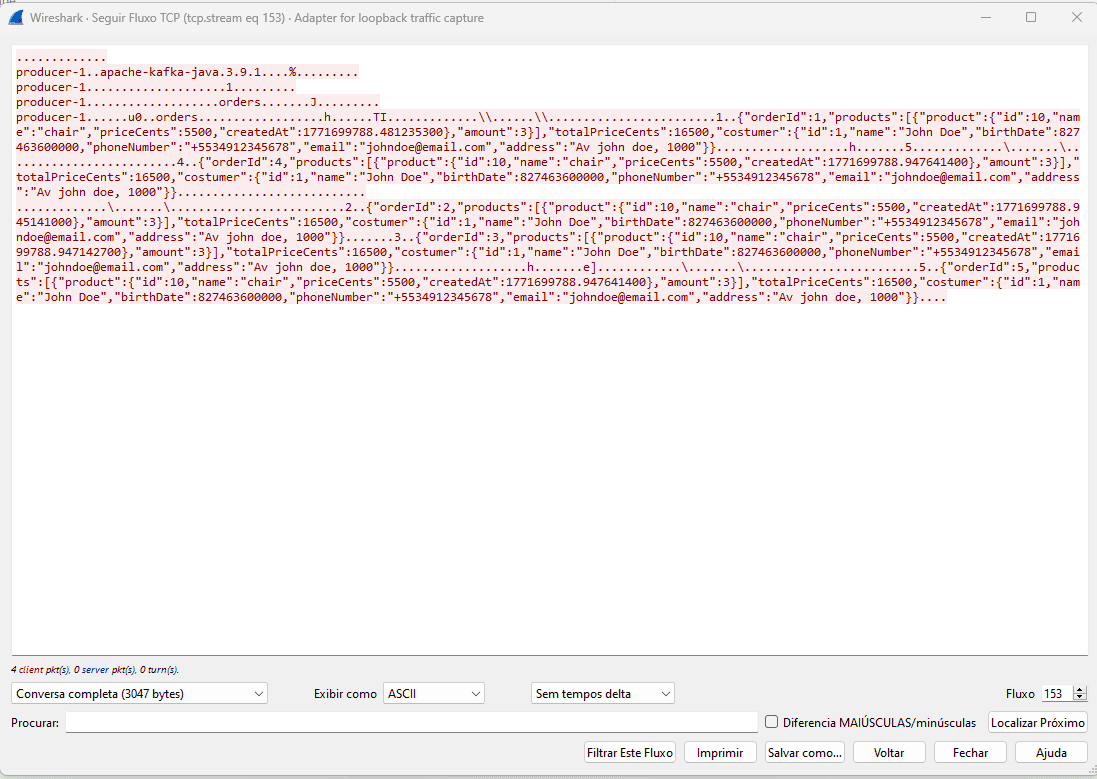
The risk of communicating in plain text
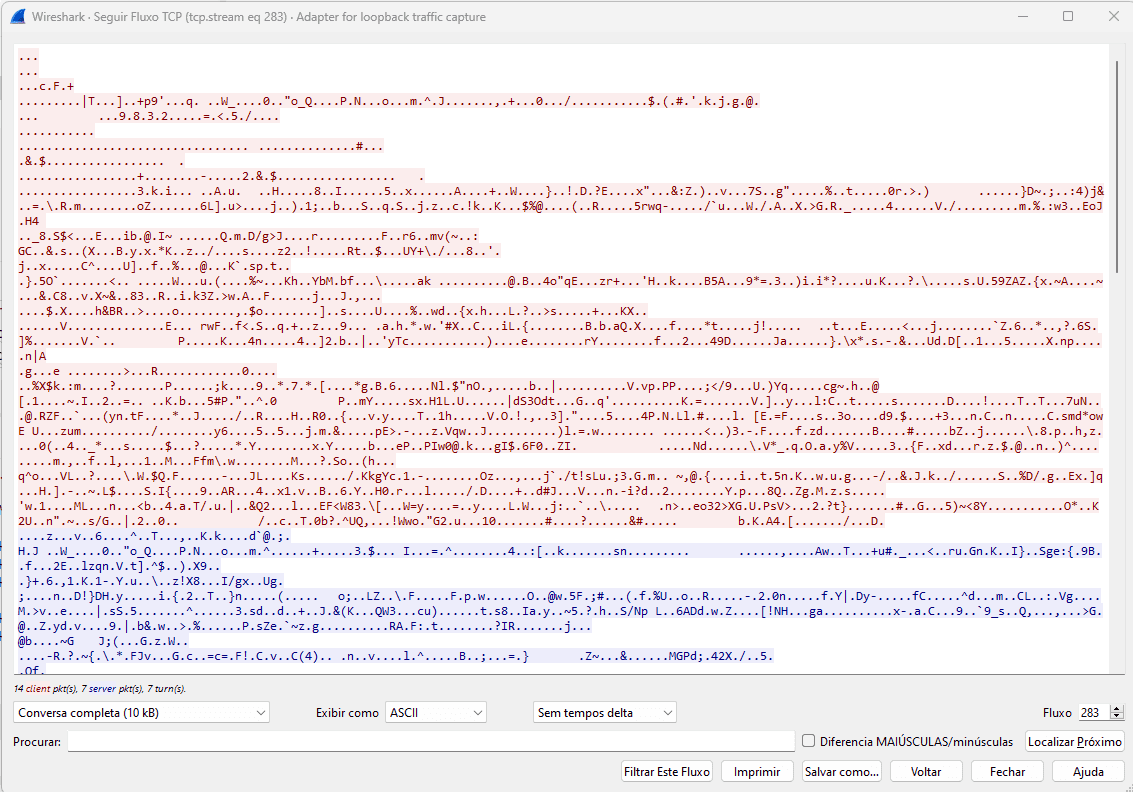
Demonstration with Wireshark
How TLS works in Kafka
The CA is the root of trust in our setup. It's a key pair whose sole purpose is to sign certificates. When the client receives the broker's certificate, it verifies whether that certificate was signed by a CA it trusts. In production you could use a recognized CA (such as Let's Encrypt), but for controlled environments it's common to create your own CA — which is exactly what we'll do here. Keystore
The keystore is the broker's "identity document". It stores the broker's private key and its certificate signed by the CA. The broker uses this data to prove its identity during the TLS handshake. Truststore
The truststore is the "list of trusted CAs". The Kotlin clients use a truststore that contains our CA's certificate. When the broker presents its certificate during the connection, the client verifies whether it was signed by a CA present in the truststore — if so, the connection is established; otherwise, it is rejected. In this setup we'll configure one-way TLS: only the broker presents a certificate and the clients verify it. Clients don't need to present their own certificate — we'll come back to this point in the conclusion.
Generating the credentials
1. Creating the CA
1-create-ca.sh
#!/usr/bin/env bash
# Creates: kafka-creds/ca-key, kafka-creds/ca-cert
set -euo pipefail

PASSWORD=123456
VALIDITY=3650
CREDS=kafka-creds

mkdir -p "$CREDS"

MSYS_NO_PATHCONV=1 openssl req -new -x509 \
-keyout "$CREDS/ca-key" \
-out    "$CREDS/ca-cert" \
-days   "$VALIDITY" \
-passout pass:"$PASSWORD" \
-subj "/CN=local-kafka-ca/OU=kafka/O=example/L=Local/ST=SP/C=BR"
2. Creating the broker keystore
2-create-server-keystore.sh
#!/usr/bin/env bash
# Creates: kafka-creds/server.keystore.jks
# Requires: kafka-creds/ca-key, kafka-creds/ca-cert
set -euo pipefail

PASSWORD=123456
VALIDITY=3650
CREDS=kafka-creds

# Generate a key pair inside the keystore
keytool -genkey -noprompt \
-keystore "$CREDS/server.keystore.jks" \
-alias    localhost \
-dname    "CN=localhost, OU=kafka, O=example, L=Local, ST=SP, C=BR" \
-keyalg   RSA \
-validity "$VALIDITY" \
-storepass "$PASSWORD" \
-keypass   "$PASSWORD"

# Export a Certificate Signing Request from the keystore
keytool -certreq -noprompt \
-keystore "$CREDS/server.keystore.jks" \
-alias    localhost \
-file     "$CREDS/cert-file" \
-storepass "$PASSWORD"

# Sign the CSR with the CA, generating the broker certificate
MSYS_NO_PATHCONV=1 openssl x509 -req \
-CA    "$CREDS/ca-cert" \
-CAkey "$CREDS/ca-key" \
-in    "$CREDS/cert-file" \
-out   "$CREDS/cert-signed" \
-days  "$VALIDITY" \
-CAcreateserial \
-passin pass:"$PASSWORD"

# Import the CA certificate so keytool can verify the chain
keytool -import -noprompt \
-keystore "$CREDS/server.keystore.jks" \
-alias    CARoot \
-file     "$CREDS/ca-cert" \
-storepass "$PASSWORD"

# Import the signed certificate, completing the keystore
keytool -import -noprompt \
-keystore "$CREDS/server.keystore.jks" \
-alias    localhost \
-file     "$CREDS/cert-signed" \
-storepass "$PASSWORD"
3. Creating the broker truststore
3-create-server-truststore.sh
#!/usr/bin/env bash
# Creates: kafka-creds/server.truststore.jks
# Requires: kafka-creds/ca-cert
set -euo pipefail

PASSWORD=123456
CREDS=kafka-creds

keytool -import -noprompt \
-keystore "$CREDS/server.truststore.jks" \
-alias    CARoot \
-file     "$CREDS/ca-cert" \
-storepass "$PASSWORD"
4. Creating the client truststore
4-create-client-truststore.sh
#!/usr/bin/env bash
# Creates: kafka-creds/client.truststore.jks
# Requires: kafka-creds/ca-cert
set -euo pipefail

PASSWORD=123456
CREDS=kafka-creds

keytool -import -noprompt \
-keystore "$CREDS/client.truststore.jks" \
-alias    CARoot \
-file     "$CREDS/ca-cert" \
-storepass "$PASSWORD"
Note for Windows / Git Bash: Git Bash automatically converts strings that look like Unix paths into Windows paths, which breaks the -subj argument passed to openssl. The scripts work around this by prefixing openssl calls with MSYS_NO_PATHCONV=1, disabling path conversion for that specific command.
Configuring the broker
docker-compose.yaml
version: '3.5'
services:
broker:
  image: apache/kafka:3.9.0
  volumes:
    - ./kafka-creds:/etc/kafka/secrets
  environment:
    KAFKA_NODE_ID: 1
    KAFKA_LISTENER_SECURITY_PROTOCOL_MAP: 'CONTROLLER:PLAINTEXT,INTERNAL:PLAINTEXT,EXTERNAL:SSL,PLAINTEXT_HOST:PLAINTEXT'
    KAFKA_ADVERTISED_LISTENERS: 'INTERNAL://broker:9093,EXTERNAL://localhost:9092,PLAINTEXT_HOST://localhost:9094'
    KAFKA_LISTENERS: 'CONTROLLER://:29093,INTERNAL://:9093,EXTERNAL://:9092,PLAINTEXT_HOST://:9094'
    KAFKA_PROCESS_ROLES: 'broker,controller'
    KAFKA_CONTROLLER_QUORUM_VOTERS: '1@broker:29093'
    KAFKA_INTER_BROKER_LISTENER_NAME: 'INTERNAL'
    KAFKA_CONTROLLER_LISTENER_NAMES: 'CONTROLLER'
    KAFKA_SSL_KEYSTORE_LOCATION: '/etc/kafka/secrets/server.keystore.jks'
    KAFKA_SSL_KEYSTORE_PASSWORD: '123456'
    KAFKA_SSL_KEY_PASSWORD: '123456'
    KAFKA_SSL_TRUSTSTORE_LOCATION: '/etc/kafka/secrets/server.truststore.jks'
    KAFKA_SSL_TRUSTSTORE_PASSWORD: '123456'
    KAFKA_OFFSETS_TOPIC_REPLICATION_FACTOR: 1
    KAFKA_NUM_PARTITIONS: 9
  ports:
    - "9092:9092"
    - "9094:9094"
kafka-ui:
  image: provectuslabs/kafka-ui:latest
  ports:
    - "8080:8080"
  environment:
DYNAMIC_CONFIG_ENABLED: 'true'- CONTROLLER:PLAINTEXT and INTERNAL:PLAINTEXT — internal cluster traffic, which remains unencrypted within the Docker network
- EXTERNAL:SSL — listener to which external clients connect, now protected by TLS on port 9092
- PLAINTEXT_HOST:PLAINTEXT — unencrypted listener on port 9094, kept for demonstration purposes (like the Wireshark capture we made earlier)
Path to the broker's keystore inside the container, which contains the private key and the signed certificate. KAFKA_SSL_KEYSTORE_PASSWORD
Password to open the keystore file. KAFKA_SSL_KEY_PASSWORD
Password for the private key entry within the keystore. KAFKA_SSL_TRUSTSTORE_LOCATION
Path to the broker's truststore, required by the Docker image even when mTLS is disabled. KAFKA_SSL_TRUSTSTORE_PASSWORD
Password to open the truststore file. Now we can start the broker:
docker compose up -dConfiguring the Kotlin clients
Kotlin
// Producer (OrderProducer.kt)
props["bootstrap.servers"]       = "localhost:9092"
props["security.protocol"]       = "SSL"
props["ssl.truststore.location"] = "./kafka-creds/client.truststore.jks"
props["ssl.truststore.password"] = "123456"
props["key.serializer"]          = "org.apache.kafka.common.serialization.StringSerializer"
props["value.serializer"]        = "dev.danielsantiago.kafka.ssl.example.config.serializer.OrderSerializer"

// Consumer (OrderConsumer.kt)
props.setProperty("bootstrap.servers",  "localhost:9092")
props["security.protocol"]       = "SSL"
props["ssl.truststore.location"] = "./kafka-creds/client.truststore.jks"
props["ssl.truststore.password"] = "123456"
props.setProperty("group.id",           "test")
props.setProperty("key.deserializer",   "org.apache.kafka.common.serialization.StringDeserializer")
props.setProperty("value.deserializer", "dev.danielsantiago.kafka.ssl.example.config.deserializer.OrderDeserializer")Instructs the Kafka client to use TLS when connecting to the broker. Without this property, the client would try to connect in plaintext even if the broker requires SSL. ssl.truststore.location
Path to the client.truststore.jks generated by script 4. The client uses this file to verify that the certificate presented by the broker was signed by our CA. The path is relative to the working directory, so always run the JARs from the repository root. ssl.truststore.password
Password to open the client truststore.
Building and running
terminal
# Build both fat JARs
./gradlew build

# In one terminal — start the consumer
java -jar build/libs/consumer.jar

# In another terminal — run the producer (sends 5 orders)
java -jar build/libs/producer.jarjava -jar build/libs/producer.jar --no-ssl