
America/Sao_Paulo
Projects

Busca Preço

image
October 16, 2026
Busca Preço (Portuguese for "price search") is an Android and iOS app that shows how much a product costs at supermarkets near you, and how much it cost a few months ago. The prices come from receipts scanned by the community itself: every purchase someone registers becomes information for everyone. I designed and built the product end to end, on my own: the mobile app, the API, the service that reads receipts from seven Brazilian states, the moderation dashboard, the infrastructure and the app store releases.
  • Role: creator and sole developer
  • Timeline: since November 2024
  • Platforms: Android, iPhone and iPad (available in Brazil, in Portuguese)
  • By the numbers: 545 users, 554 receipts processed and 5,961 prices published
  • Available on: Google Play · App Store · buscapreco.net
After the pandemic, I had the feeling that coffee got more expensive every time I went to the supermarket. But when it came time to compare, I could never remember how much I had paid the last time. The answer was at the bottom of the shopping bag. In Brazil, every retail purchase generates an NFC-e, an electronic consumer invoice that lists the name, barcode and price of each item, plus the store's tax ID and address. The QR code printed on the receipt links to a public portal run by the state tax authority (SEFAZ), with all of that in detail. In other words, reliable price data is produced with every purchase, all over the country. It just isn't anywhere you can look it up. If each person scanned their own receipts, together they would add up to a crowdsourced price history, store by store.
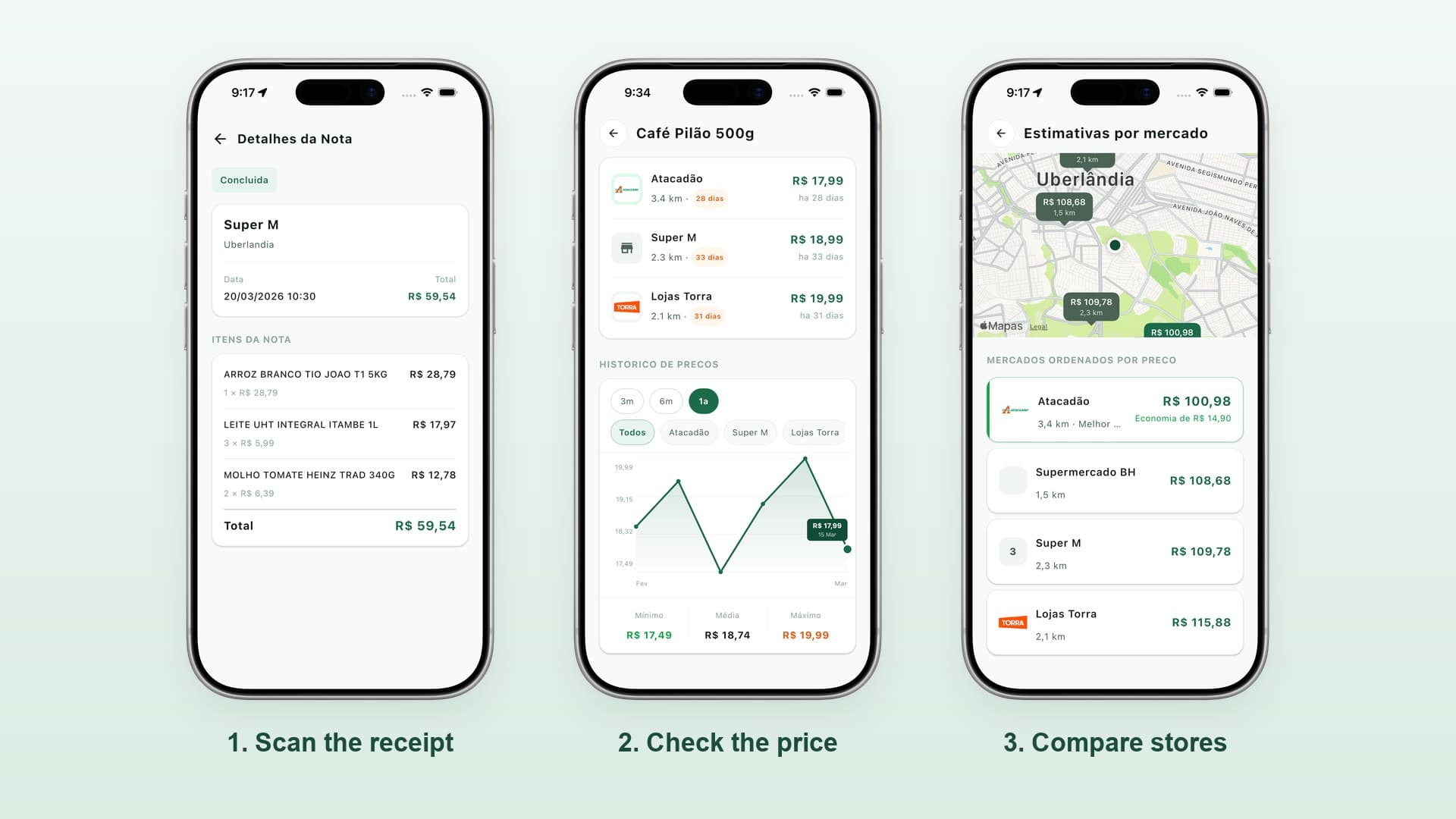
Three app screens: the details of a scanned receipt, the price history of a coffee brand and a shopping list estimate per store.
  1. Scan the receipt. The app reads the QR code and the backend fetches the items from the SEFAZ portal. Each item becomes a recorded price, with a date and a store.
  2. Look up a product. By name or by barcode, you can see its price at nearby stores and how it has changed over time.
  3. Compare stores. Build a shopping list and the app estimates the total at each store in the area. After you shop, it shows how much you saved compared with the others.
Architecture diagram: the app and the moderation dashboard talk to the Spring Boot API, which uses PostgreSQL, Redis and S3, delegates receipt reading to a Python service and integrates with Open Food Facts, Google Places, Cloud Vision and Firebase.
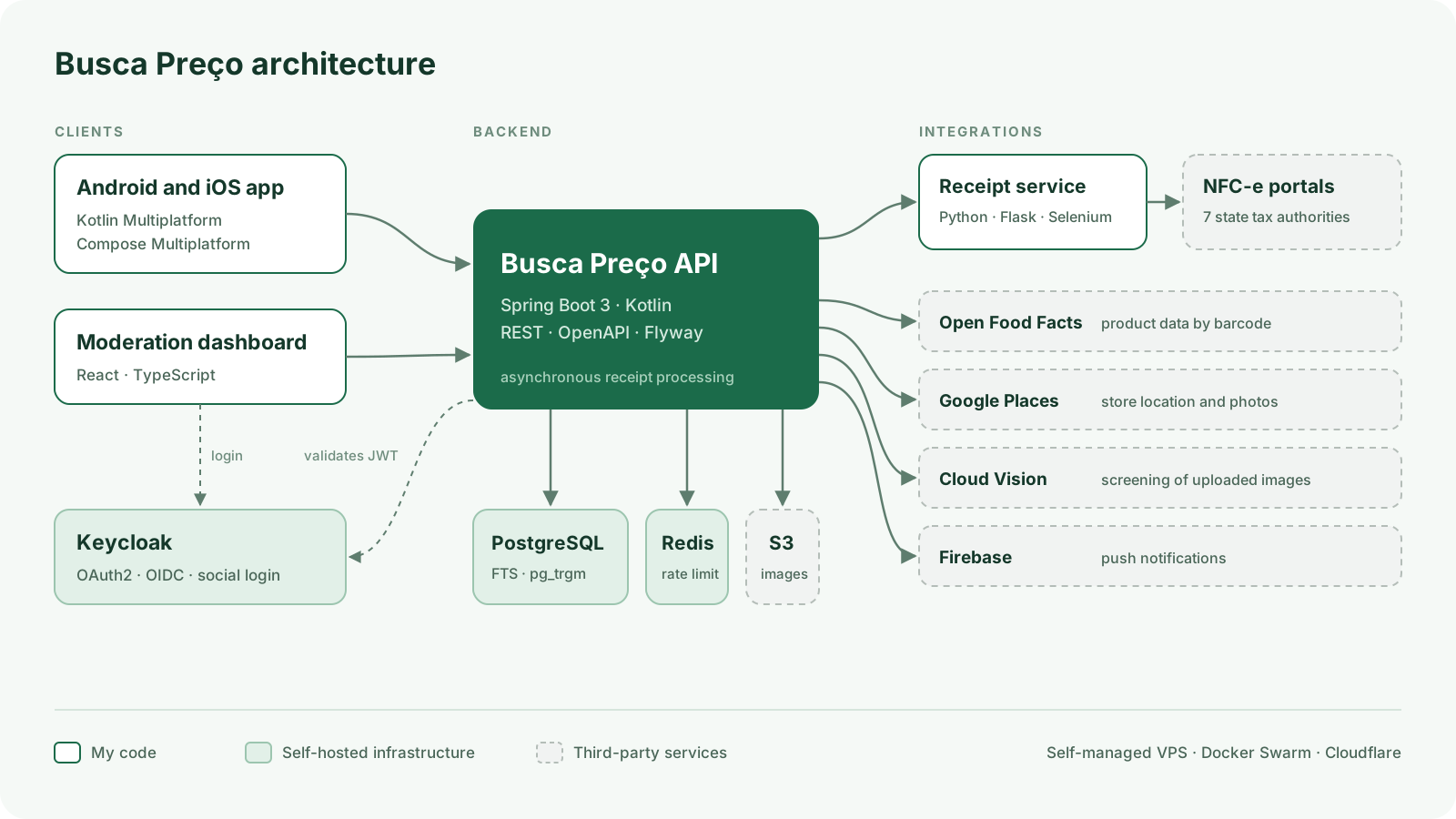
At the core of the system is an API built with Spring Boot and Kotlin. It holds the business rules and is the only component that touches the database. The same Kotlin runs in the app, which targets Android and iOS with Kotlin Multiplatform. The moderation dashboard is a React SPA, and authentication runs on a self-hosted Keycloak with social login. Receipt reading lives in a separate Python service. Browser automation is slow, memory-hungry and breaks every time a portal changes its layout. Keeping it in its own service means a failing portal doesn't take down the API, and I can ship a fix for one state without touching anything else. The API processes receipts asynchronously: the user scans, keeps using the app and gets a notification once the receipt has been processed. Everything runs on a self-managed VPS, with Docker Swarm, behind Cloudflare.
Almost every hard problem in Busca Preço has the same root: the data comes from the real world. It is produced by thousands of different point-of-sale systems, and none of them was designed to be read by another program. The strategy that kept coming back throughout the project was to automate the common case and build a cheap path for a person to fix the rest.
There is no public API for citizens to look up their own receipts. Each state has its own portal, with its own HTML, navigation flow and quirks. What they all share is the 44-digit access key printed on the receipt, whose first two digits identify the state. The receipt service uses that as a router: it reads the state code and hands the key to the reader for that portal. Every reader implements the same contract, so the backend doesn't care whether a receipt comes from São Paulo or Rondônia. Seven states are supported today: DF, GO, MG, RJ, RO, SC and SP. Extracting the data from each page is done by pure functions, tested against real pages saved as fixtures. When a portal changes, I save the new page, adjust the parser and run the tests for every state to make sure I haven't broken any of the others. I also rate-limit the requests sent to each portal: the service depends on public infrastructure, and I don't want to be the reason it slows down. The cost of this approach is maintenance. Reading web pages is fragile by nature, and each new state is practically a small project of its own. I accepted that cost because no other source has the accuracy the app needs.
The first version of search used trigram similarity (pg_trgm) in PostgreSQL. It tolerates typos, but it has no notion of what a word is, and the results showed it:
QueryTop result (before)Top result (after)
leite (milk)Creme de leite (heavy cream)Leite integral (whole milk)
papel higiênico (toilet paper)Tapete higiênico (pet pad)Papel higiênico (toilet paper)
The obvious move would have been to spin up Elasticsearch. I evaluated it and passed: the cost of running another cluster wasn't justified at the current scale. Instead, I solved it inside Postgres by combining signals:
  • Full-text search with a Portuguese dictionary and accent stripping: "higiênico" and "higienico" become the same term, and results containing every word in the query rank above the rest.
  • Per-field weights: a match in the product name counts more than a match in the brand.
  • Word position: "Leite integral" starts with the query term and "Creme de leite" doesn't. That was the signal that fixed the milk case.
  • Trigrams as a fallback, when nothing else matches, to keep tolerating typos.
  • Popularity as a tiebreaker, based on how many recent prices each product has.
The change was confined to ranking. Parameters and response format stayed the same, so the apps didn't need any update.
Packaged products have barcodes, which makes it easy to tell when two records are the same product. Products sold by weight don't: each store names them however it wants. A single cut of beef (contra filé, a striploin) showed up in the database as ten different products: "Contra File", "Car Contra File Bovi", "Carne Bovina Contra File", "[pr] Carne Contra File Kg"… That fragments the price history and makes it impossible to compare the price of that cut across stores, which is exactly the app's core value. The temptation was to merge everything automatically by text similarity, but it fails in both directions. "Coxão mole" and "coxão duro" are nearly identical as text, yet they are different cuts (top round and bottom round) with different prices. A wrong merge would corrupt precisely the data the app exists to compare. Meanwhile, "Car Contra File Bovi" and "Contra Filé" are the same cut and have low similarity. The solution was to split the work: the algorithm suggests, a person decides. A job groups candidates and scores each pair, and I approve or reject the suggestions in the moderation dashboard. The link is non-destructive: each absorbed product points to a representative of its group, no price is deleted or rewritten, and any merge can be undone. New receipts are then matched against this curated catalog, which stops new duplicates from being created. I considered embeddings and passed: for telling cuts of beef apart, a curated vocabulary works better and doesn't require new infrastructure.
The app was born Android-only, in Jetpack Compose. To get to the iPhone, the options were rewriting it in Swift (two codebases and a new language), rewriting everything in Flutter or React Native, or migrating to Kotlin Multiplatform with Compose Multiplatform. I chose the last one. Screens, ViewModels, repositories, business rules and the networking layer moved into a shared module. Only what depends on the operating system has a per-platform implementation:
FeatureAndroidiOS
Camera and barcode scanningCameraX + ML KitAVFoundation + Vision
SubscriptionsGoogle Play BillingStoreKit 2
LocationGoogle Play ServicesCoreLocation
The migration came at a cost: I swapped out Android-only libraries (Retrofit for Ktor, Hilt for Koin) and had to learn enough of Apple's ecosystem to integrate the camera, payments and notifications. In return, the app reached iPhone and iPad with the same features as on Android, and every new feature is now written only once.
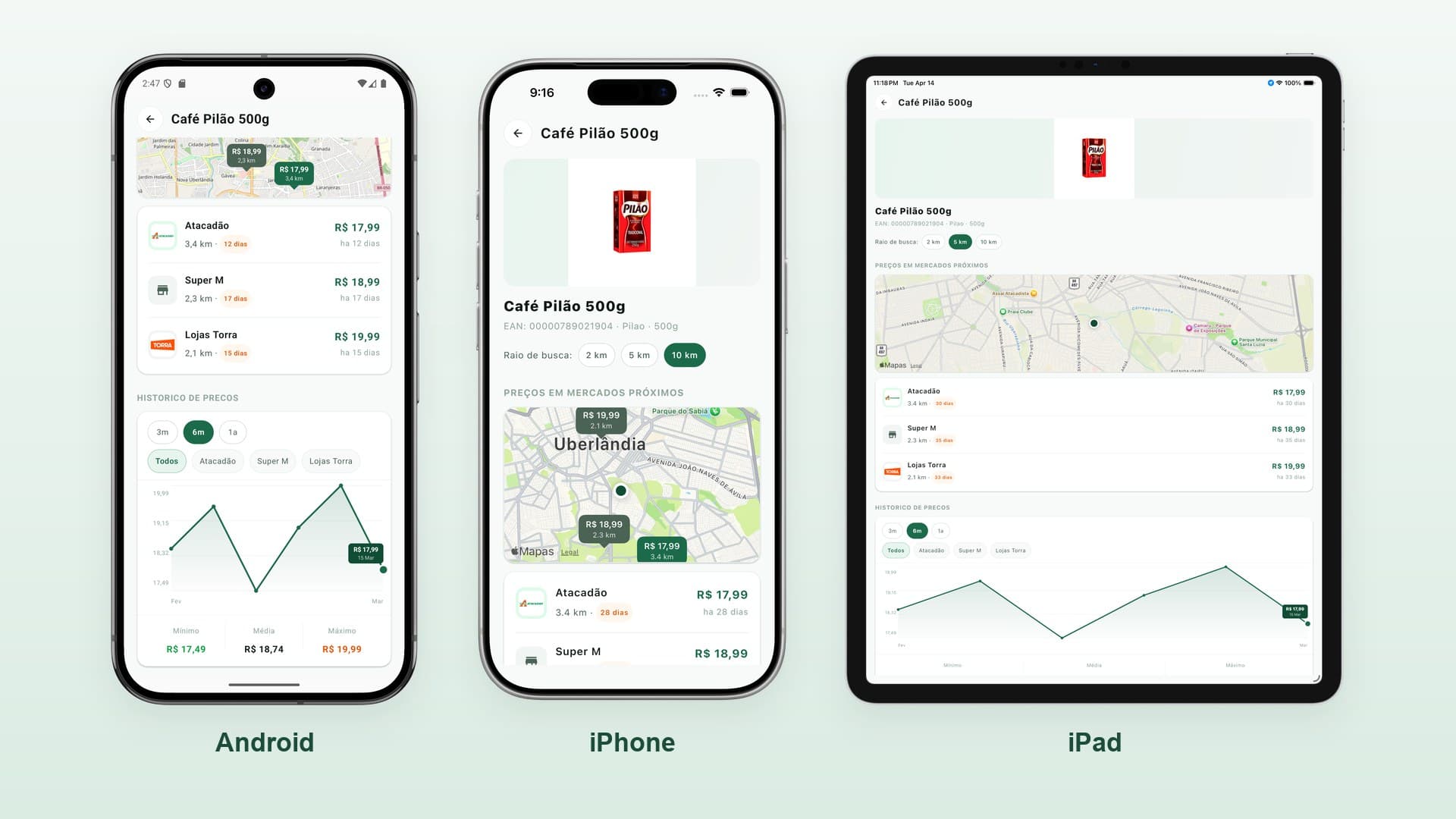
The same product screen running on Android, iPhone and iPad.
  • Product data. In Brazil, barcode databases are mostly closed. The app first queries Open Food Facts, which is openly licensed, and gives proper credit. When a product isn't there, it is created from the receipt itself (where it shows up as "LEITE UHT INTEGRAL ITAMBE 1L"), and the community can complete the entry with a photo and details. Submissions go through automatic screening for inappropriate images and then manual moderation. The category is assigned automatically from the NCM code, the tax classification that already comes with every item on the receipt.
  • Where is this store? The receipt carries the store's tax ID, legal name and address, but no coordinates, and not the name people actually know it by. The backend geocodes the address, searches nearby places and picks the candidate by street number and name similarity. When it gets it wrong, the user who registered the store can pick another candidate, and I can fix it on a map in the dashboard.
  • The chicken-and-egg problem. An empty crowdsourced app has no value, and without value nobody contributes. That's why looking up prices costs credits: some renew every day, for people who just want to use the app, and others are earned by contributing, with receipts that have more items earning more. Experience levels give a sense of progress, and the subscription removes the limits. There are also anti-abuse protections, which, for obvious reasons, I won't detail here.
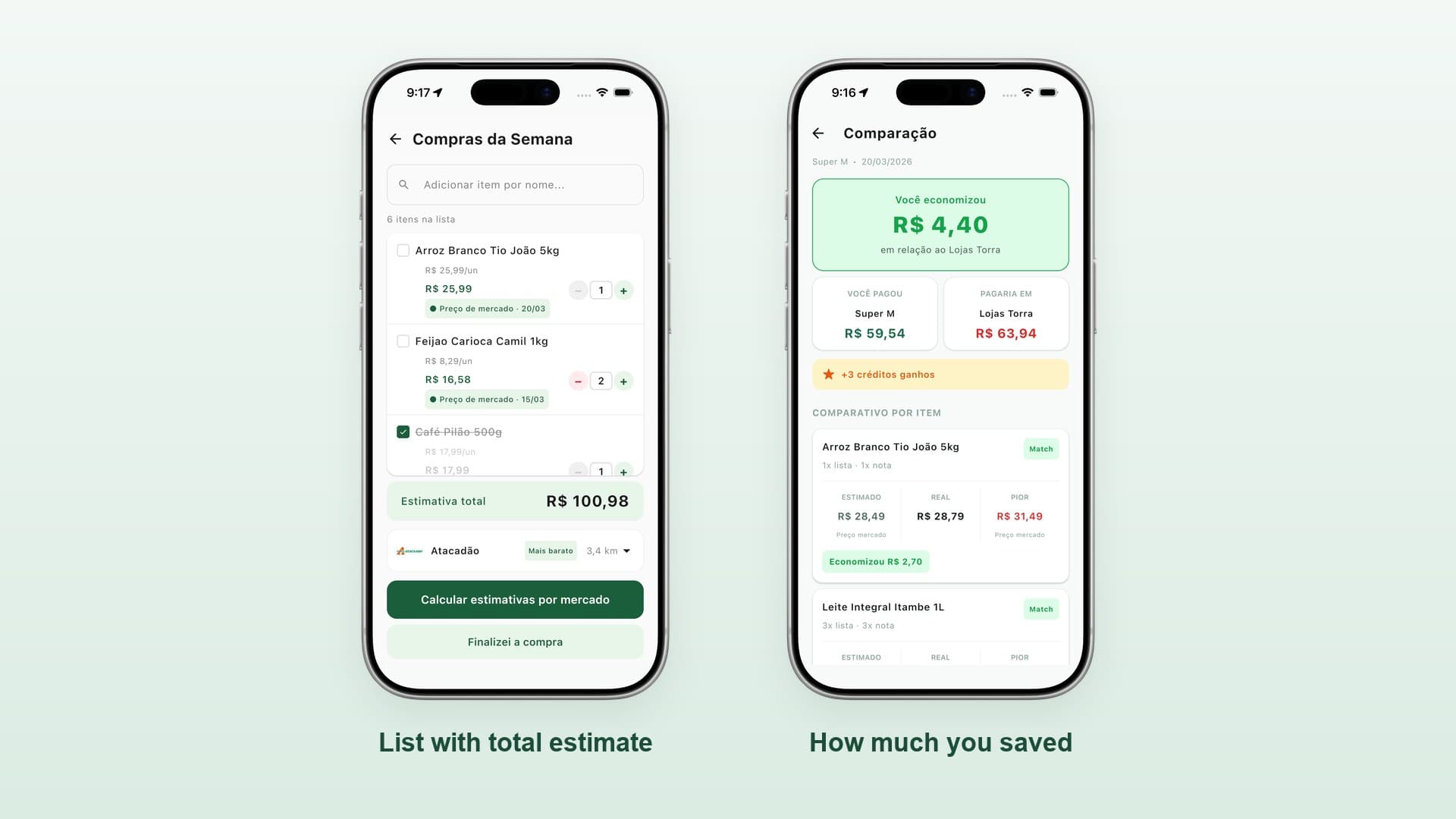
A shopping list with its total estimate and a comparison screen showing how much the user saved and the credits they earned.
Busca Preço is live on Google Play and the App Store, for iPhone and iPad, and reads receipts from seven states. So far:
  • 545 users
  • 554 receipts processed
  • 5,961 prices published
These are the numbers of a project that is still early, but every price came from a real purchase, registered by someone who wanted to contribute.
  • Record where your data comes from, from day one. In early versions, I also used other product data sources. When I reviewed their licensing, I decided to stick to open sources and community submissions, even at the cost of coverage. The migration re-queried the whole catalog and removed the images whose license wasn't compatible. It would have been much simpler if I had known where each record came from: two thirds of the catalog had no such information, and the only safe way out was to reprocess all of it.
  • A human in the loop is a feature, not a hack. Stores, products sold by weight, user submissions: in all of these cases, the best design was for the algorithm to suggest and a person to confirm, with reversible decisions.
  • Use the database you already have until it truly can't keep up. PostgreSQL handled full-text search, typo tolerance and ranking without adding another system to operate.
  • Isolate what's fragile. The most unstable part of the system, reading the portals, lives in its own service and doesn't take the rest down when it fails.
  • Write before you code. Before every significant feature, I write a short design document with the context, the decisions and what's out of scope. There are more than 60 of them now, and they are what made this write-up possible.
  • Mobile: Kotlin Multiplatform, Compose Multiplatform, Ktor, Koin
  • Backend: Kotlin, Spring Boot 3, Spring Security (OAuth2), JPA, Flyway, OpenFeign, Testcontainers
  • Data: PostgreSQL (full-text search and pg_trgm), Redis, S3
  • Receipt ingestion: Python, Flask, Selenium
  • Moderation dashboard: React, TypeScript, Vite, Tailwind, TanStack Query
  • Website: Astro
  • Authentication: Keycloak (OIDC, social login)
  • Infrastructure: self-managed VPS, Docker Swarm, Cloudflare, Prometheus
  • Integrations: Open Food Facts, Google Places and Geocoding, Cloud Vision, Firebase Cloud Messaging, Google Play Billing, StoreKit 2